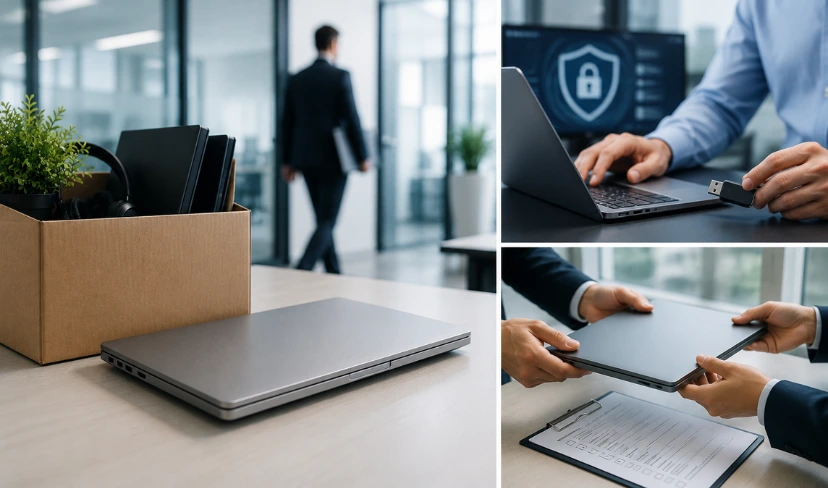
An employee leaves on a Friday. Their laptop stays behind in a spare room three counties away, still logged into email, still holding client files and internal documents, and nobody in IT has flagged it as a risk. For distributed teams, this is not a rare slip. It is the default state of offboarding, and it is exactly the gap an offboarding laptop collection service is built to close.
Most companies have a return policy on paper. Fewer have a way to enforce it once someone is working three hundred miles from head office. The laptop that never quite makes it back is not just a lost asset, it is an active security liability sitting on a shelf, in a drawer, or in a bin bag headed for landfill.
This article sets out why remote offboarding is the quiet gap in most IT security checklists, what a proper offboarding laptop collection service actually involves, and how UK organisations are closing it.
Why Is Remote Offboarding Different?
When everyone worked from the same building, IT could physically collect a leaver’s laptop before they left the car park. Remote and hybrid work removed that safety net without anyone replacing it. The device now has to travel back to IT, and until it does, the data on it is effectively unmanaged.
This matters more than most offboarding checklists admit. A laptop is not just hardware. It carries local caches of email, saved credentials, VPN configurations and, in many cases, cached access to shared drives and client systems that a password reset alone does not fully close off.
What Counts as a Security Gap in Laptop Offboarding?
A security gap in laptop offboarding is the period between an employee’s last working day and the physical return of their company device, during which the laptop, its local data and any cached credentials remain outside IT’s direct control. The longer this window stays open, the greater the risk of data exposure, licence misuse or the device simply never coming back.
For remote and hybrid teams, this window regularly stretches into weeks rather than hours, which is why a growing number of UK organisations now build remote employee laptop management into their standard leaver process rather than treating it as an afterthought.
Not Sure Where Your Leavers' Laptops Actually End Up?
Transputec runs a structured offboarding laptop collection service for UK organisations with distributed teams, tracking every device from last working day to secure wipe and audit-ready disposal.
Get a Strategic ConsultationWhat Is an Offboarding Laptop Collection Service?
An offboarding laptop collection service is a structured process, usually run by an IT partner or managed service provider, that retrieves company devices from departing employees wherever they are working, verifies the data on them, and returns them to a secure asset lifecycle rather than leaving retrieval to chance. It typically covers scheduling collection, tracking the device in transit, wiping the drive to a recognised standard, and logging the outcome for audit purposes.
For organisations with people working from home across the UK, this replaces the informal “post it back to the office” approach that quietly fails a large share of the time. Transputec’s device lifecycle management service builds collection into the wider lifecycle, so a returned laptop is wiped, refreshed and redeployed rather than sitting in a cupboard.
How Do You Retrieve Laptops From Remote Workers Across the UK?
You retrieve laptops from remote workers by combining a clear return policy with a logistics process that does the chasing for the employee, rather than leaving it to an email reminder and hoping the laptop turns up. Structured programmes that track collection end to end recover devices far more reliably than an ad hoc request on the last working day.
A workable process usually looks like this:
- HR flags the leaver to IT as soon as the resignation or termination date is confirmed.
- IT books a courier collection for the last working day or the day after, rather than waiting for the employee to arrange it.
- The device is tracked in transit until it is checked back into the asset register.
- Non-return triggers an escalation after a fixed number of days, rather than drifting indefinitely.
This is the practical core of how to retrieve laptops from remote workers UK teams manage well, and it is the foundation of solid remote employee laptop management once a fleet is spread across the country.
What Should a Remote Employee Offboarding IT Security Checklist Include?
A remote employee offboarding IT security checklist should include account deactivation, licence reclamation, VPN and MFA revocation, physical device collection, and a documented data wipe with a certificate of destruction or sanitisation. Transputec’s guide on whether a factory reset is enough explains why a basic reset rarely meets that bar.
In practice, the checklist should run in this order:
- Revoke access first: disable accounts, MFA and VPN credentials the moment the leaver’s last day is confirmed.
- Reclaim licences so seats are not paid for and left unused.
- Schedule device collection rather than waiting for the laptop to be returned voluntarily.
- Confirm the wipe and log it before the leaver record is closed.
Skipping the collection step because “the employee seemed fine” is one of the more common ways UK organisations end up with unaccounted-for hardware still holding live credentials months later, which is the core gap a proper offboarding laptop collection service is designed to close.
What Should a Work From Home Laptop Return Policy in the UK Cover?
A work from home laptop return policy should state the return deadline relative to the last working day, who arranges and pays for courier collection, what happens if the device is damaged or lost, and the consequence of non-return. Vague policies that simply say “please return your laptop” rarely get devices back on time.
At minimum, the policy should cover:
- Return deadline, stated as a number of days from the last working day, not “as soon as possible”.
- Collection method, ideally a prepaid courier arranged by the employer rather than the employee.
- Damage or loss terms, including whether cost can be recovered from final pay where the contract allows it.
- Visibility, meaning the policy is referenced in the employment contract and repeated the moment a resignation is submitted.
How Does IT Asset Management for Remote Workers Reduce Risk?
IT asset management for remote workers reduces risk by keeping a live record of where every device is, who holds it, and when it is due back, so a leaver’s laptop is flagged the moment their employment end date is confirmed rather than discovered missing during an audit. Without this, remote fleets tend to develop “ghost” devices that exist on paper but cannot be located. Getting IT asset management for remote workers UK teams can rely on starts with an accurate, live asset register, not an annual audit.
Proper work from home IT asset management also means the return process is already defined before someone resigns. The courier details, the wipe standard and the escalation contact are set up in advance, so retrieval does not depend on one person in HR remembering the steps at a busy moment. Transputec’s guide to what a proper laptop lifecycle looks like covers how collection, re-imaging and redeployment fit together once a device is back in the building.
What Makes a Secure Laptop Offboarding Process Work for Distributed Teams?
A secure laptop offboarding process works for distributed teams when collection, wiping and disposal are treated as one continuous chain of custody rather than three separate tasks handled by different people. Gaps appear exactly at the handoffs: between HR and IT, between IT and the courier, and between the courier and whoever performs the wipe.
Closing those gaps is largely what a well-run offboarding laptop collection service is designed to do: one accountable process, one tracked chain of custody, and one audit trail from the leaver’s last day to a certificate confirming the device was wiped to a recognised standard such as the NCSC’s guidance on decommissioning assets. A remote worker device retrieval service that cannot produce that certificate is not actually closing the gap, it is just moving the laptop to a different shelf.
Conclusion
The device itself is where most remote offboarding processes quietly fail. Accounts get disabled, licences get reclaimed, and then a laptop sits in a spare room for months holding cached credentials nobody thought to chase.
An offboarding laptop collection service closes that gap by making retrieval a scheduled, tracked step in the leaver process rather than something left to a departing employee’s goodwill. Paired with proper remote employee laptop management, it turns a security blind spot into a documented, audit-ready part of the process.
Transputec runs offboarding laptop collection service, secure wipe and redeployment for UK organisations with distributed teams, so nothing about a leaver’s device is left to chance. If you are not certain where every laptop from the last twelve months of leavers has ended up, that is worth finding out.
FAQs
What Exactly Is an Offboarding Laptop Collection Service?
An offboarding laptop collection service is a managed process that retrieves company laptops from departing employees, verifies and wipes the data, and logs the device back into the IT asset register. It replaces informal “post it back” return policies with a tracked, scheduled process. Transputec’s device lifecycle management service includes this as standard for UK clients with distributed teams.
How Do I Retrieve Laptops From Remote Workers UK-Wide?
You retrieve laptops from remote workers UK-wide by pairing a fixed return deadline with prepaid courier collection, rather than relying on the employee to arrange the post themselves. Structured programmes that track collection end to end recover devices far more reliably than an email reminder on the last working day, which is the backbone of solid work from home IT asset management for distributed teams.
What Should a Remote Employee Offboarding IT Security Checklist Cover?
A remote employee offboarding IT security checklist should cover account and MFA deactivation, licence reclamation, physical device collection, and a documented data wipe with a certificate. The device collection step is the one most checklists miss, which is why laptops with live cached credentials keep turning up months after someone has left.
Does GDPR Apply to Laptop Collection From Home Workers?
Yes. GDPR applies to laptop collection from home workers because a company laptop typically holds personal data covered by UK GDPR, so an unreturned or unwiped device is a live data protection risk, not just a lost asset. The ICO’s guidance on working from home sets out the wider security expectations organisations need to meet for home-based staff.
Should We Use a Remote Worker Device Retrieval Service or Handle Collection In-House?
Most organisations without dedicated logistics find a remote worker device retrieval service more reliable than handling collection in-house, because a specialist offboarding laptop collection service tracks courier collection, wipe and disposal as one accountable process rather than several disconnected internal tasks. In-house collection can work at small scale, but it tends to break down once leavers are spread across multiple regions.
This article was drafted with AI assistance and reviewed by the Transputec team. Featured image: AI-generated.