Most businesses don’t treat device returns as a formal process. A remote employee hands in their notice, the laptop goes in a box, and IT eventually gets it back sometime later with no data wipe, no asset log, and no plan for what comes next. For organisations running distributed teams across the UK, this is one of the most common and costly gaps in IT operations.
Laptop lifecycle management is the structured process of tracking, collecting, reimaging, and redeploying or retiring devices across their full operational life. Done properly, it covers everything from the moment a device is provisioned to a user, through its active working life, to the point it is securely wiped and returned to service or compliantly disposed of. A device that moves through this process cleanly is an asset. One that does not is a cost and a risk.
For organisations managing laptop lifecycle management for remote teams UK-wide, the challenge is coordination: devices are geographically dispersed, returns require planning, and the gap between an employee leaving and IT recovering the hardware can stretch into weeks. Every uncollected or unwiped device in that window represents operational waste and a compliance exposure under UK GDPR.
This guide sets out what a structured approach to laptop lifecycle management looks like in practice: how collection, reimaging, and redeployment should work for a distributed workforce, and how to close the gaps that most organisations currently leave open.
What Happens When Laptop Lifecycle Management Breaks Down
When businesses manage devices informally, the problems compound quickly. Devices go missing between offboarding and return. Returned laptops sit in storage without being wiped or reassigned. Hardware refreshes happen reactively rather than on a planned cycle, which means staff are held back by ageing machines long after performance starts to degrade.
For remote teams, the risks are magnified. Without a laptop swap out service in place, replacing a failing device relies on a string of manual steps: an employee raises a ticket, IT diagnoses the fault remotely, a replacement is ordered, it ships to the office or a central location, and someone arranges a second shipment to the employee. That sequence can take two weeks or more. During that time, the employee is either working on a degraded machine or using personal equipment.
The operational cost of poor lifecycle management shows up in three places: productivity loss from devices that are not refreshed on schedule, security exposure from machines returned but not properly wiped, and financial waste from hardware sitting idle in IT storage rather than being redeployed to new starters.
The Four Stages of a Proper Laptop Lifecycle
A well-managed laptop lifecycle moves through four stages. Knowing where your organisation sits within each stage is the starting point for identifying where the process is breaking down.
Stage 1: Procurement and provisioning. Devices are sourced, configured, and deployed to users with the right software, security settings, and access controls in place. For remote workers, this includes pre-configuration and direct-to-employee delivery.
Stage 2: Active use and monitoring. Throughout the device’s working life, it should be enrolled in device management tools that allow IT to monitor health, push updates, and remotely lock or wipe if the device is lost or stolen.
Stage 3: Collection and reimaging. When a device is returned, whether because an employee has left, hardware is due for refresh, or a swap out has been requested, it needs to be collected securely, wiped to a recognised standard, and reimaged before redeployment. This is where most organisations’ processes break down.
Stage 4: Redeployment or compliant disposal. A reimaged device in good condition goes back into the deployment pool. End-of-life devices are disposed of under WEEE regulations with a documented audit trail.
UK businesses typically have reasonable processes at Stages 1 and 2. The gaps appear consistently at Stage 3.
Ready to Take Control of Your Laptop Lifecycle?
Transputec manages the full device lifecycle for distributed UK workforces, from collection and reimaging through to redeployment and compliant disposal.
Get a Strategic ConsultationHow to Collect and Re-image Laptops from Remote Workers
Collecting a device from a remote employee involves more coordination than most IT teams plan for. There is no controlled handover point. The employee packs the machine themselves, ships it through a courier, and IT receives it days later without any oversight of what happened in between.
A managed laptop lifecycle management process for remote teams addresses this at every stage. Collection is scheduled in advance, ideally triggered automatically when HR records an employee’s exit date. A prepaid, tracked returns label is issued to the employee. The device is picked up from their address or a convenient local point, and the chain of custody is logged from the moment the courier collects it.
When the device arrives at the staging facility, it is logged against the employee’s asset record and queued for certified data erasure before reimaging begins. This step is non-negotiable. A device that has stored corporate emails, client files, or saved credentials cannot be passed to a new user without a verified, documented wipe. The NCSC’s device security guidance sets the baseline for how UK organisations should handle end-of-life device sanitisation.
Reimaging covers installing a clean operating system, applying the organisation’s standard software configuration, enrolling the device in management tools, and running a quality check before it is cleared for redeployment. For a device refresh service for distributed workforce UK, this process typically runs in a central facility rather than at individual offices, allowing consistent standards and faster throughput.
What a Device Refresh Service Actually Delivers
A device refresh service is more than a hardware replacement cycle. For UK organisations with distributed workforces, it is the mechanism that keeps the device fleet current, secure, and cost-effective without placing the management burden on individual IT staff or line managers.
A well-structured device refresh service for a distributed workforce includes the following elements:
- Planned refresh intervals. Devices are replaced on a defined cycle, typically three to four years, aligned with manufacturer support windows and the organisation’s performance standards. Reactive replacement is significantly more expensive than planned refresh.
- Condition-based assessment. Before refresh is triggered, devices are evaluated against a standard covering battery health, screen condition, processing performance, and storage state. Devices that still meet the threshold can be reallocated rather than replaced, reducing cost.
- Direct-to-employee delivery. New or reimaged devices are configured and shipped directly to remote employees, removing the office as an intermediary and reducing deployment lead times.
- Coordinated swap out. A laptop swap out service for remote employees ensures the replacement arrives before the old machine is collected, minimising downtime.
This is what laptop lifecycle management looks like at the hardware renewal stage: not a reaction to failure, but a planned programme that keeps the fleet within a known operational envelope.
The Laptop Swap Out Service: Getting It Right for Remote Staff
A laptop swap out service is the operational component that handles the physical exchange: collecting the old device from a remote employee while delivering the replacement in a coordinated sequence. When it works well, the employee experiences minimal disruption. When it does not, they are left without a device or waiting for a courier that never arrives.
The key elements of a well-run laptop swap out service for remote employees are:
- Pre-scheduled collection windows. The employee books a collection slot that fits their working pattern. The courier arrives within that window and issues a tamper-evident bag for the outgoing device.
- Pre-arrival device configuration. The replacement device is fully configured, enrolled in MDM, and tested before it leaves the depot. The employee does not spend their first morning setting up software.
- Chain of custody documentation. Each device transfer is logged with serial number, condition report, and timestamp. This is particularly important for organisations subject to data protection requirements under UK law.
- Remote employee communication. Clear pre-arrival communication telling the employee what to expect, what to back up (if anything), and what happens after collection.
For organisations with IT procurement requirements across distributed teams, a managed swap out service removes the need for employees to travel to an office or hand devices to IT staff. The entire exchange happens at the employee’s location, on a schedule that works for them.
What a Managed Laptop Collection and Redeployment Service Looks Like
When a device reaches the end of its active life, whether through age, damage, or redeployment to a new user, the collection and redeployment process needs to be as structured as the original provisioning. An ad hoc approach creates gaps: devices go missing, data is not wiped properly, or perfectly usable hardware is disposed of when it could be repurposed.
A managed laptop collection and redeployment service typically follows this sequence:
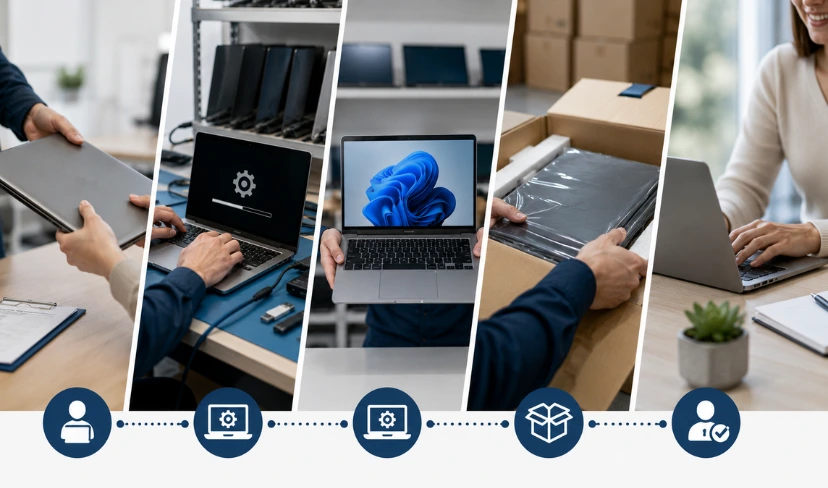
- Trigger. A leaver notification, refresh interval alert, or fault report initiates the process. The device is flagged for collection in the asset management system.
- Employee communication. The departing user or current device holder receives instructions on what data to back up and what the collection process involves.
- Scheduled collection. A courier collects the device from the employee’s location using tamper-evident packaging. A receipt is issued and the serial number is confirmed at collection.
- Intake assessment. The device arrives at the depot and is assessed for physical condition, battery health, and storage state. A decision is made: refurbish and redeploy, or dispose compliantly.
- Data wipe. Certified data erasure is performed to the relevant standard (NIST 800-88 or equivalent), with a wipe certificate issued. This is not a factory reset; it is a verified, documented process.
- Reimaging. If the device is being redeployed, the standard image is applied, MDM enrolment is completed, and the device is tested against the acceptance checklist.
- Redeployment or disposal. The reimaged device is assigned to its next user and shipped to their location. Devices not meeting the redeployment standard are disposed of with certified documentation.
- Asset register update. The asset management system is updated to reflect the device’s new status: redeployed, disposed, or in stock.
For context on how data sanitisation fits into this process, the previous post on why a factory reset is not enough for remote laptop wipes covers the distinction between basic resets and certified erasure in detail.
Choosing the Right Laptop Lifecycle Management Provider
Not every IT provider that offers device procurement also offers structured collection, reimaging, and redeployment. Many stop at the point of sale. Before committing to a laptop lifecycle management provider, it is worth asking specific questions about what the service actually covers.
Questions worth asking during supplier evaluation:
- Do you handle remote employee collections, or only office-based returns? A provider that requires employees to post devices or visit an office is not suited to distributed workforces.
- What data erasure standard do you certify to? NIST 800-88 is the recognised benchmark. If a provider cannot name a standard, that is a gap.
- Can you provide asset tracking from collection through to redeployment or disposal? You should be able to see where every device is at every stage.
- What is the typical turnaround from collection to redeployment-ready? This affects your planning for new starter provisioning and leavers processing.
- Do you provide wipe certificates and disposal documentation? UK organisations subject to the UK GDPR need to demonstrate compliant data handling. Documentation is not optional.
- Can your service scale with our headcount? A provider that works for 50 devices may not have the logistics capacity for 500.
For data protection obligations relevant to device disposal, the UK government’s guidance on data protection sets out the legal framework organisations need to be aware of. Transputec’s managed IT services cover the full device lifecycle from procurement through to compliant disposal.
Managing Laptop Lifecycle at Scale
The challenge with laptop lifecycle management is that it scales poorly without a structured programme. A business with 30 employees can manage device returns informally. A business with 300 employees distributed across the UK cannot.
At scale, the risks compound. Devices go unreturned for months after employees leave. Refresh cycles drift because no one is tracking expiry dates. New starters wait weeks for configured hardware. Security teams have no visibility of what is in the field and in what state.
A managed lifecycle programme addresses this by treating device management as an ongoing operational discipline rather than a set of one-off tasks:
- Continuous asset visibility. Every device is tracked in a central register. Status, location, age, and condition are known at any point. There are no missing assets.
- Automated refresh triggers. Devices approaching their refresh threshold are flagged ahead of time, not after they have failed. Procurement is initiated in time to avoid gaps.
- Integrated leaver and joiner processes. When an employee leaves, the device collection process starts automatically. When a new employee joins, a configured device is ready to ship.
- Reporting and compliance. Regular reporting gives IT and finance visibility of fleet age, upcoming refresh costs, and disposal documentation.
The NCSC device security guidance underlines why maintaining an accurate picture of your device estate matters from a security standpoint, not just an operational one. Organisations that treat laptop lifecycle management as a programme, rather than an ad hoc task, consistently have better security posture and lower device-related costs.
Conclusion
Effective laptop lifecycle management is not a single project. It is an operational programme that runs alongside your workforce, keeping devices current, data protected, and IT costs predictable. For UK organisations with remote or distributed teams, the gap between informal device handling and a structured lifecycle approach is often visible in the things that go wrong: slow onboarding, unreturned assets, uncertain data disposal, and unexpected hardware costs.
The four stages — procurement, active use, collection and reimaging, and redeployment or disposal — each require defined processes, clear ownership, and the right logistics support. When those elements are in place, the fleet manages itself as a programme rather than as a series of emergencies.
Transputec provides end-to-end laptop lifecycle management for remote and distributed teams across the UK, covering the full cycle from procurement and provisioning through to certified disposal. If your current approach has gaps, the best starting point is a conversation about where those gaps are and what a structured programme would look like for your organisation. Speak to the Transputec team to explore what managed device lifecycle looks like in practice.
FAQs
What is laptop lifecycle management?
Laptop lifecycle management is the structured process of overseeing devices from procurement through to disposal. It includes provisioning new devices for employees, tracking assets during active use, collecting devices when employees leave or hardware ages out, reimaging them to a clean standard, and either redeploying them to new users or disposing of them compliantly. A formal lifecycle approach replaces ad hoc device handling with a repeatable programme that keeps the fleet secure, current, and cost-predictable.
How do you collect and re-image laptops from remote workers?
Collecting and reimaging laptops from remote workers involves scheduling a courier collection at the employee’s home or remote location, securing the device in tamper-evident packaging, and transporting it to a depot for processing. At the depot, data is wiped to a certified standard such as NIST 800-88, the standard operating image is applied, MDM enrolment is completed, and the device is tested before redeployment or disposal. The process requires coordination between IT, HR, and logistics, and works best when it is triggered automatically by a leaver notification or refresh alert rather than managed manually. Transputec’s IT procurement services include end-to-end collection and reimaging for distributed teams.
What is a device refresh service and when does a business need one?
A device refresh service is a managed programme that replaces ageing hardware on a planned cycle, typically every three to four years, rather than waiting for devices to fail. It includes condition assessment, direct-to-employee delivery of replacements, and coordinated collection of outgoing devices. Businesses need a device refresh service when their fleet is approaching or past manufacturer support windows, when reactive device failures are affecting productivity, or when they cannot track which devices are due for replacement. For distributed workforces, a managed service removes the logistics burden from internal IT teams.
What does a laptop swap out service involve?
A laptop swap out service handles the physical exchange of devices between an organisation and its employees. It involves scheduling a courier to collect the old device from the employee’s location, delivering the replacement device at the same time or in advance, and confirming the exchange with chain of custody documentation. For remote employees, a well-run swap out service means the replacement arrives configured and ready to use before the old device is collected, so the employee experiences little or no downtime. The service is distinct from procurement: it is the logistics and handover layer of the lifecycle rather than the purchasing layer.
How do I choose an end-to-end laptop lifecycle management provider in the UK?
When evaluating an end-to-end laptop lifecycle management provider in the UK, focus on whether they cover the full cycle or only part of it. Key questions include: do they handle remote employee collections (not just office-based returns), what data erasure standard do they certify to, can they provide asset tracking across the full lifecycle, and do they issue wipe certificates and disposal documentation for UK GDPR compliance. Also assess their logistics capacity for your headcount and whether their leaver and joiner processes integrate with your HR systems. Transputec’s managed IT services cover all of these elements for UK organisations with distributed workforces.